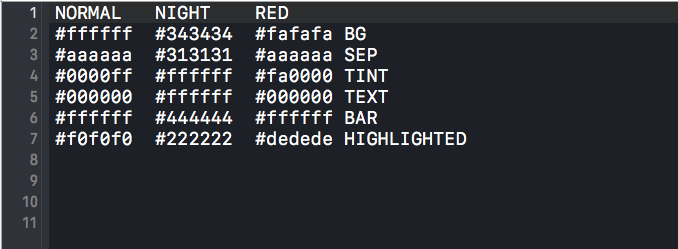
主要借助一个第三方开源框架DKNightVersion
使用方法:
1.cocoapods导入框架
pod 'DKNightVersion'
2.全局引入头文件
在pcp文件或Hearder文件中引入头文件
#import <DKNightVersion.h>
3.编辑txt文件
在文件目录下:Resources->DKColorTable.txt 查看内容样式,
根据需要进行修改
4.在需要设置夜间模式的位置进行设置
- (void)touchesBegan:(NSSet<UITouch *> *)touches withEvent:(UIEvent *)event{
if ([self.dk_manager.themeVersion isEqualToString:DKThemeVersionNormal]) {
    [[DKNightVersionManager sharedManager] nightFalling];
}else{
    [[DKNightVersionManager sharedManager] dawnComing];
}
//或者这样设置
    self.dk_manager.themeVersion = @"RED";//设置红色背景
}
5.项目中所有控件颜色,文字都需要设置额外属性,如:
    self.view.dk_backgroundColorPicker = DKColorPickerWithKey(BG);//view设置背景
    self.navigationController.navigationBar.dk_barTintColorPicker = DKColorPickerWithKey(BAR);//设置navigationBar上文字在各个状态下的显示效果
    self.navigationItem.leftBarButtonItem.dk_tintColorPicker = DKColorPickerWithKey(TINT);//navigationItem设置文字
    self.tableView.dk_backgroundColorPicker = DKColorPickerWithRGB(0xffffff, 0x343434, 0xfafafa);//tableView设置背景
    self.tableView.dk_separatorColorPicker = DKColorPickerWithKey(SEP);//
    cell.dk_cellTintColorPicker = DKColorPickerWithRGB(0xffffff, 0x343434, 0xfafafa);//
    [button dk_setTitleColorPicker:DKColorPickerWithKey(TINT) forState:UIControlStateNormal];//button设置文字
    textField.dk_textColorPicker = DKColorPickerWithKey(TEXT);//textField设置文字
    navigationLabel.dk_textColorPicker = DKColorPickerWithKey(TEXT);//label设置文字
    imageView.dk_imagePicker = DKImagePickerWithNames(@"normal1", @"night1", @"normal1");//设置各种模式下图片
    imageView.dk_alphaPicker = DKAlphaPickerWithAlphas(1.f, 0.6f, 0.2f);//设置各种模式下图片透明度
具体实现代码参考pods目录下DKNightVersion->UIKit 目录下个属性;